
Dashboard
Overview
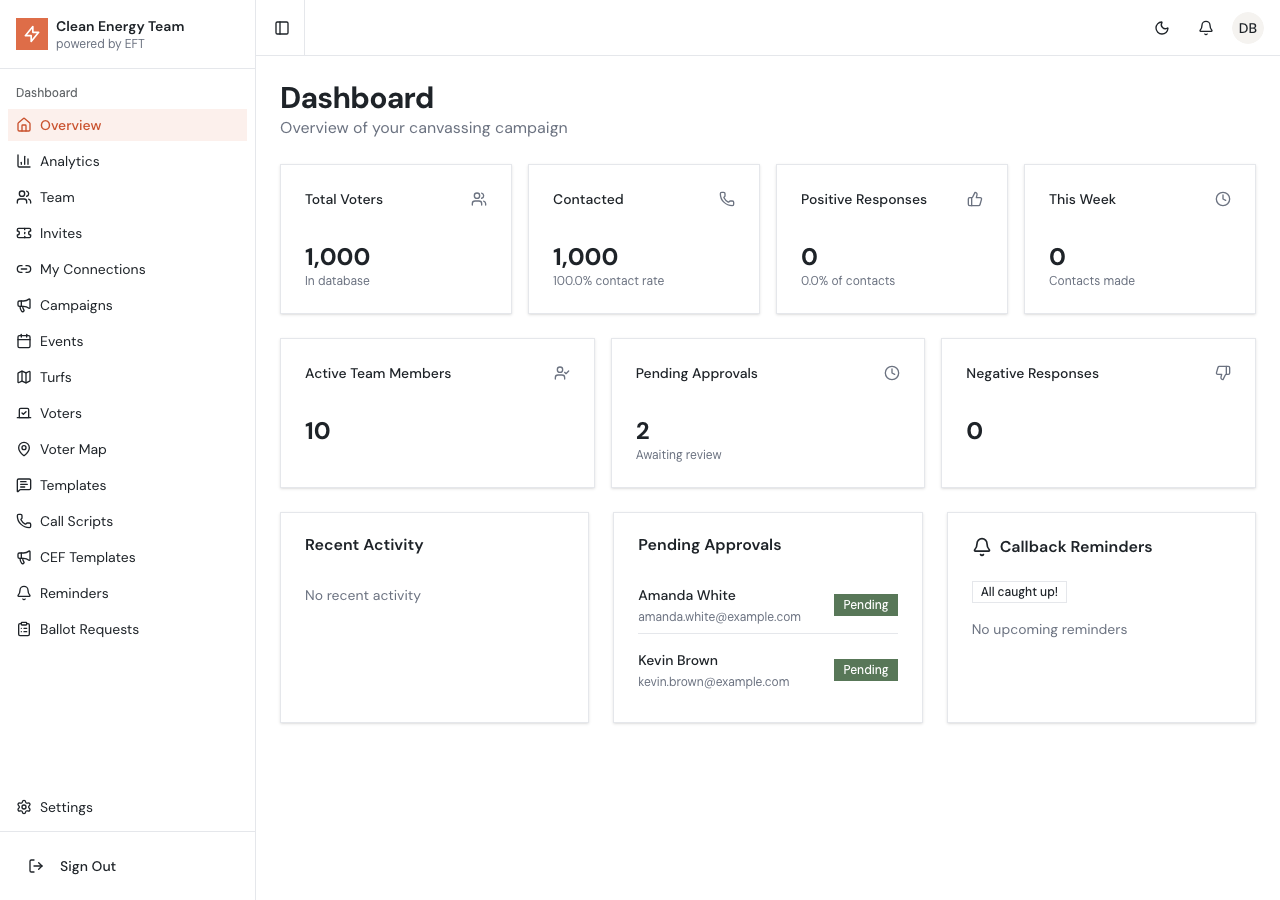
Section titled “Overview”The Dashboard is the home page of the admin portal, providing a quick snapshot of your canvassing campaign’s progress. It displays key statistics, recent activity, pending approvals, and upcoming callback reminders.
Key Statistics
Section titled “Key Statistics”The dashboard shows several important metrics in stat cards at the top:
Primary Stats
Section titled “Primary Stats”| Metric | Description |
|---|---|
| Total Voters | Number of voters in your database |
| Contacted | Voters with a recorded canvass result (excluding “Not Contacted”) |
| Positive Responses | Voters marked as supportive, strong support, leaning, willing to volunteer, or requested sign |
| This Week | Number of contacts made in the past 7 days |
Secondary Stats
Section titled “Secondary Stats”| Metric | Description |
|---|---|
| Active Team Members | Users with canvasser, team lead, or admin roles |
| Pending Approvals | New signups awaiting approval |
| Negative Responses | Voters marked as opposed, strongly opposed, or do not contact |
Recent Activity Panel
Section titled “Recent Activity Panel”Shows the 5 most recent voter contacts with:
- Result - The canvass outcome (Supportive, Opposed, etc.)
- Method - How contact was made (Phone, Door, Text)
- Voter ID - Partial voter identifier
- Date - When the contact occurred
Pending Approvals Panel
Section titled “Pending Approvals Panel”Displays up to 5 pending user signups waiting for approval:
- Name - User’s full name or email
- Email - User’s email address
- Status - Shows “Pending” badge
Callback Reminders Panel
Section titled “Callback Reminders Panel”Shows scheduled callback reminders for voter follow-ups:
Summary Badges
Section titled “Summary Badges”- Overdue (red) - Reminders past their scheduled time
- Due Today (gray) - Reminders scheduled for today
- All Caught Up - Displayed when no pending reminders
Reminder List
Section titled “Reminder List”Shows up to 5 upcoming reminders with:
- Voter Name - Name of the voter to call back
- Time - Scheduled callback time
- View Button - Link to the voter’s detail page
Quick Navigation
Section titled “Quick Navigation”From the dashboard, you can quickly access:
- Team Page - By clicking on pending approvals
- Voters Page - By clicking on voter IDs in recent activity
- Reminders Page - By clicking “View All” in the reminders panel
Refresh Behavior
Section titled “Refresh Behavior”Dashboard statistics are loaded fresh on each page visit. For real-time updates, refresh the page or navigate away and back.