CEF Templates
Overview
Section titled “Overview”CEF Templates (Clean Energy Friends Templates) are pre-written text messages that volunteers using the Clean Energy Friends app can send to their contacts. These templates help ensure consistent messaging while making it easy for casual volunteers to reach out to people they know.
Accessing CEF Templates
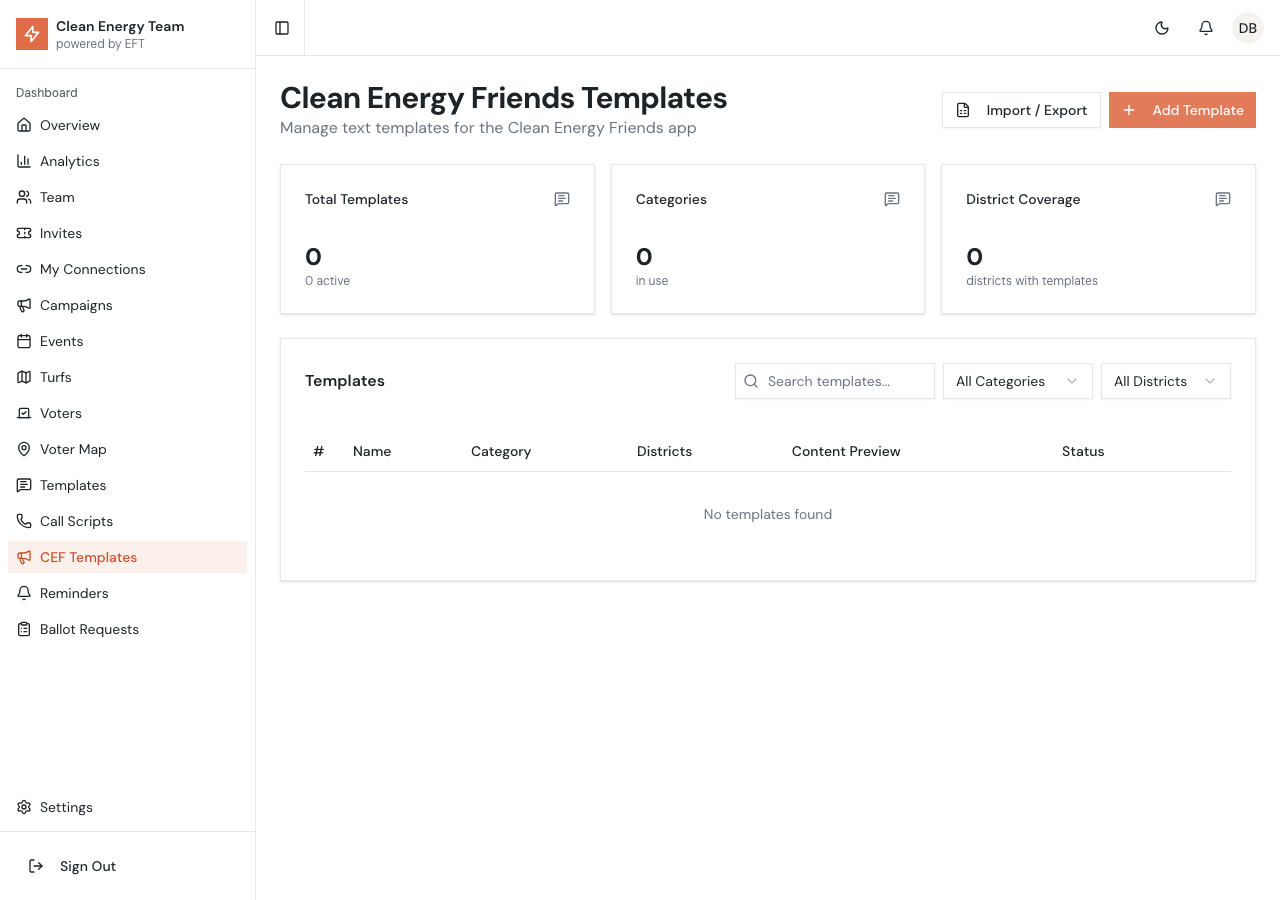
Section titled “Accessing CEF Templates”Click CEF Templates in the sidebar to view and manage all templates for the Clean Energy Friends app.
Template Statistics
Section titled “Template Statistics”The top of the page shows:
| Stat | Description |
|---|---|
| Total Templates | Number of templates in the system |
| Categories | Number of unique categories in use |
| District Coverage | How many districts have templates assigned |
The stats also show how many templates are currently active.
Template List
Section titled “Template List”The template table displays:
- Order - Display order in the app
- Name - Template name shown to volunteers
- Category - Type of message (Introduction, Follow-up, etc.)
- Districts - Which districts see this template
- Content Preview - Truncated message preview
- Status - Active/Inactive badge, plus Default indicator
Creating a Template
Section titled “Creating a Template”- Click Add Template
- Fill in the template details:
| Field | Description |
|---|---|
| Name | Short name for the template |
| Category | Message type (see categories below) |
| Content | The actual message text |
| Districts | Which districts should see this template |
| Display Order | Position in the template list |
| Is Active | Whether the template is available |
| Is Default | If this is the default template for its category |
- Click Save
Template Categories
Section titled “Template Categories”Templates are organized by category to help volunteers find the right message:
| Category | Purpose |
|---|---|
| Introduction | First contact with someone new |
| Follow-up | Second or subsequent contacts |
| Reminder | Remind about voting or events |
| Event | Invite to campaign events |
| Thank You | Post-election appreciation |
| General | Other general messaging |
Each category has a distinct color for easy identification.
District Targeting
Section titled “District Targeting”Templates can be targeted to specific SRP districts (1-10):
- All Districts - Template available everywhere
- Specific Districts - Only visible in selected districts
This allows you to customize messaging for different candidates or local issues.
Managing Templates
Section titled “Managing Templates”Editing Templates
Section titled “Editing Templates”- Click the menu icon on the template row
- Select Edit
- Modify the template content
- Click Save
Activating/Deactivating
Section titled “Activating/Deactivating”Toggle templates on or off without deleting:
- Click the menu icon
- Select Activate or Deactivate
Inactive templates don’t appear in the Clean Energy Friends app.
Deleting Templates
Section titled “Deleting Templates”- Click the menu icon
- Select Delete (shown in red)
- Confirm deletion
Import/Export
Section titled “Import/Export”Exporting Templates
Section titled “Exporting Templates”- Click Import / Export
- Select Export
- Choose format (CSV or JSON)
- Download the file
Export includes all template data for backup or transfer.
Importing Templates
Section titled “Importing Templates”- Click Import / Export
- Select Import
- Upload your file (CSV or JSON)
- Review the preview
- Confirm import
Filtering Templates
Section titled “Filtering Templates”Use the filters to narrow down the list:
- Search - Find by name or content
- Category - Filter by template category
- District - Filter by district assignment
Best Practices
Section titled “Best Practices”Writing Effective Templates
Section titled “Writing Effective Templates”- Keep messages short and conversational
- Use friendly, personal language
- Include a clear call to action
- Avoid political jargon
Template Organization
Section titled “Template Organization”- Use clear, descriptive names
- Set logical display order
- Mark one default per category
- Deactivate outdated templates
District Customization
Section titled “District Customization”- Create district-specific templates when candidates differ
- Use general templates for universal messaging
- Test templates in each district before launch
Template Variables
Section titled “Template Variables”CEF Templates support dynamic variables that auto-fill:
| Variable | Replaced With |
|---|---|
{firstName} | Contact’s first name |
{candidate} | District candidate name |
Example:
Hey {firstName}! Have you heard about {candidate} running for SRP Board?Differences from SMS Templates
Section titled “Differences from SMS Templates”CEF Templates are for the Clean Energy Friends app, while SMS Templates (accessible under Templates) are for the full SRP Canvass app. Key differences:
| Feature | CEF Templates | SMS Templates |
|---|---|---|
| App | Clean Energy Friends | SRP Canvass |
| Users | Casual volunteers | Trained canvassers |
| Complexity | Simpler | More detailed |
| Audience | Personal contacts | Assigned voters |